Designing a WhatsApp FAQ Chatbot — Three-Level Menus, Reply Buttons, and Human Handoff
Published
On this page
- What limits apply to WhatsApp interactive messages?
- Step 1: Clean up the FAQ sheet
- Step 2: Design a three-level dialogue tree
- Step 3: End every answer with the same three buttons
- Step 4: Tag each question with one handling type
- Step 5: After handoff, the bot must step back
- What if customers type instead of tapping the menu?
- Pre-launch checklist
- How UFOSEND’s WhatsApp Business API supports this
- FAQ
- Further reading
Key takeaways
- An FAQ sheet cannot go straight onto WhatsApp: merge duplicate questions, fill in missing answers, then tag how each question is handled.
- A WhatsApp list message holds at most 10 rows across all sections, so use a three-level structure (main menu → category → question) with 9 questions per page plus a “More questions” row.
- Every answer ends with the same three reply buttons: Solved, Still need help, Main menu.
- For questions that need an order or account lookup, the bot collects the order number first, then hands it to a human agent together with the chat transcript.
- Once a conversation is handed to a human, the bot must stop auto-replying so it never talks over the agent.
Many businesses that open a WhatsApp Business API account want to do one thing first: “put our website FAQ on WhatsApp.” But a web FAQ is built for scrolling, while WhatsApp works one message at a time, driven by buttons. Paste the whole FAQ into one long message and most customers will not read it — they will just type “Hello? Anyone there?”
This article uses a demo brand, X LEAD SHOP (a fictional Hong Kong online store). The scenario: a customer receives a “your order has shipped” template, replies with a question, and so opens a 24-hour customer service window. From there an FAQ bot routes common questions through list menus, and anything involving an order is handed to a human agent once the bot has collected the order number.
What limits apply to WhatsApp interactive messages?
Before designing menus, know Meta’s limits for interactive messages (Meta documentation: list messages, reply buttons):
| Element | Limit |
|---|---|
| Rows in a list message | Up to 10 rows across all sections |
| List row title | 24 characters |
| List row description | 72 characters |
| Button that opens the list | 20 characters |
| List message body | 4,096 characters |
| Reply buttons | Up to 3 |
| Reply button title | 20 characters |
| Reply button message body | 1,024 characters |
These limits shape the whole design: few options, short titles, concise answers. Buttons and lists are non-template messages sent inside the 24-hour window that opens when a customer messages you, so they do not need template approval. For the difference between the conversation window and template messages, see WhatsApp Business API in Hong Kong.
Step 1: Clean up the FAQ sheet
A support team’s FAQ sheet usually grows over years and has three typical problems:
- Duplicate questions: “How do I return an item?”, “I want to return this” and “Return process” are the same question.
- Missing answers: the question is there, the answer cell is empty.
- Written for the web: answers say “see the table below” or “click the menu on the left” — none of which exists in WhatsApp.
While cleaning up, tag every question with three things: its category, how it is handled (see Step 4) and what data to collect first. Do not launch questions without an answer — a customer who taps one will get a blank reply or a bare “please contact support.”
Step 2: Design a three-level dialogue tree
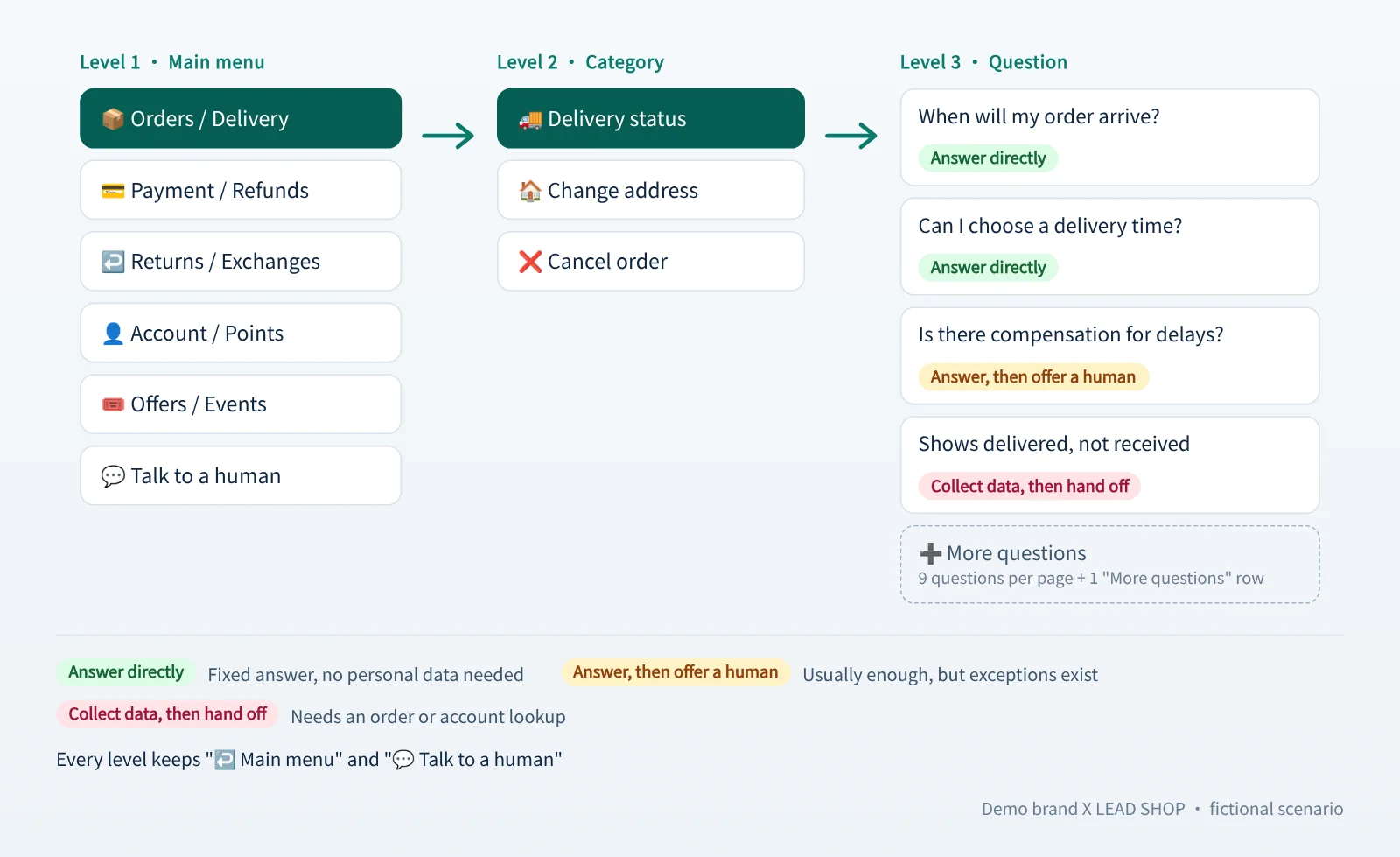
Using X LEAD SHOP as the example:
| Level 1 (main menu) | Level 2 (category) | Level 3 (sample question) |
|---|---|---|
| 📦 Orders / Delivery | Delivery status, Change address | When will my order arrive? |
| 💳 Payment / Refunds | Payment failed, Refund status | Payment failed — is my promo code lost? |
| ↩️ Returns / Exchanges | Return conditions, Exchange process | Can I return an opened item? |
| 👤 Account / Points | Password, Points balance | When do my points expire? |
| 🎟️ Offers / Events | Promo codes, Member day | Why is my promo code invalid? |
| 💬 Talk to a human | Contact support | I want to talk to a person |
Design principles:
- Keep the main menu to 6–8 items so a single list message shows all of them.
- Show 9 questions per page at level 3 and use row 10 for “More questions” instead of cutting questions to fit the 10-row limit.
- Write each title as a complete phrase within 24 characters. Do not rely on truncation — a title cut off with ”…” is hard to understand.
- Always keep “Talk to a human” so customers who cannot find an answer have a way out.
Step 3: End every answer with the same three buttons
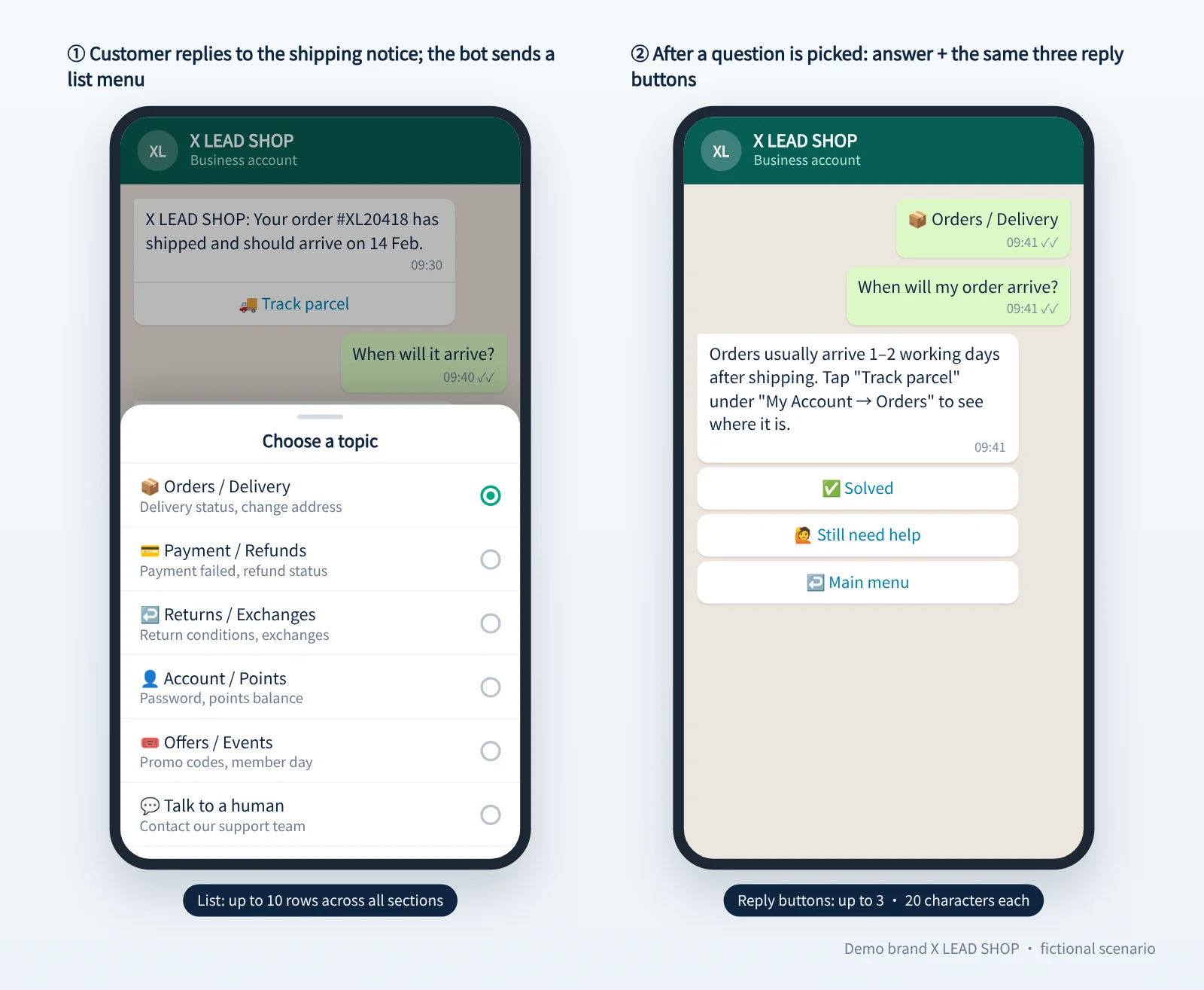
Every answer ends with the same three reply buttons:
- ✅ Solved
- 🙋 Still need help
- ↩️ Main menu
Three is exactly the reply button limit, and because every answer uses the same set, customers learn it after one use. It is also worth reviewing the Solved vs Still-need-help ratio per question regularly to find answers that need rewriting.
Step 4: Tag each question with one handling type
| Handling type | When to use | X LEAD SHOP example |
|---|---|---|
| Answer directly | The answer is fixed and needs no personal data | How many days do I have to return an item? |
| Answer, then offer a human | The answer usually suffices, but exceptions exist | Why is my promo code invalid? |
| Collect data, then hand off | An order or account lookup is needed | I paid, but my order still shows unpaid |
The third type matters most. Do not just reply “please contact support” — have the bot ask first, for example:
Please send your order number (you can find it under “My Account → Orders”).
The collected data goes to the agent together with the transcript. The agent picks up already knowing which order it is and what happened, so the customer does not have to explain again.
If you need more than one or two pieces of information — a return request, say, needs the order number, the reason and a pickup address — asking one question at a time invites drop-off. Use a WhatsApp Flow in-chat form instead, so the customer fills everything in on one screen and submits once.
Do not collect sensitive personal data on WhatsApp, such as ID card or credit card numbers. Collect only the minimum needed for the lookup, such as the order number or registered email.
Step 5: After handoff, the bot must step back
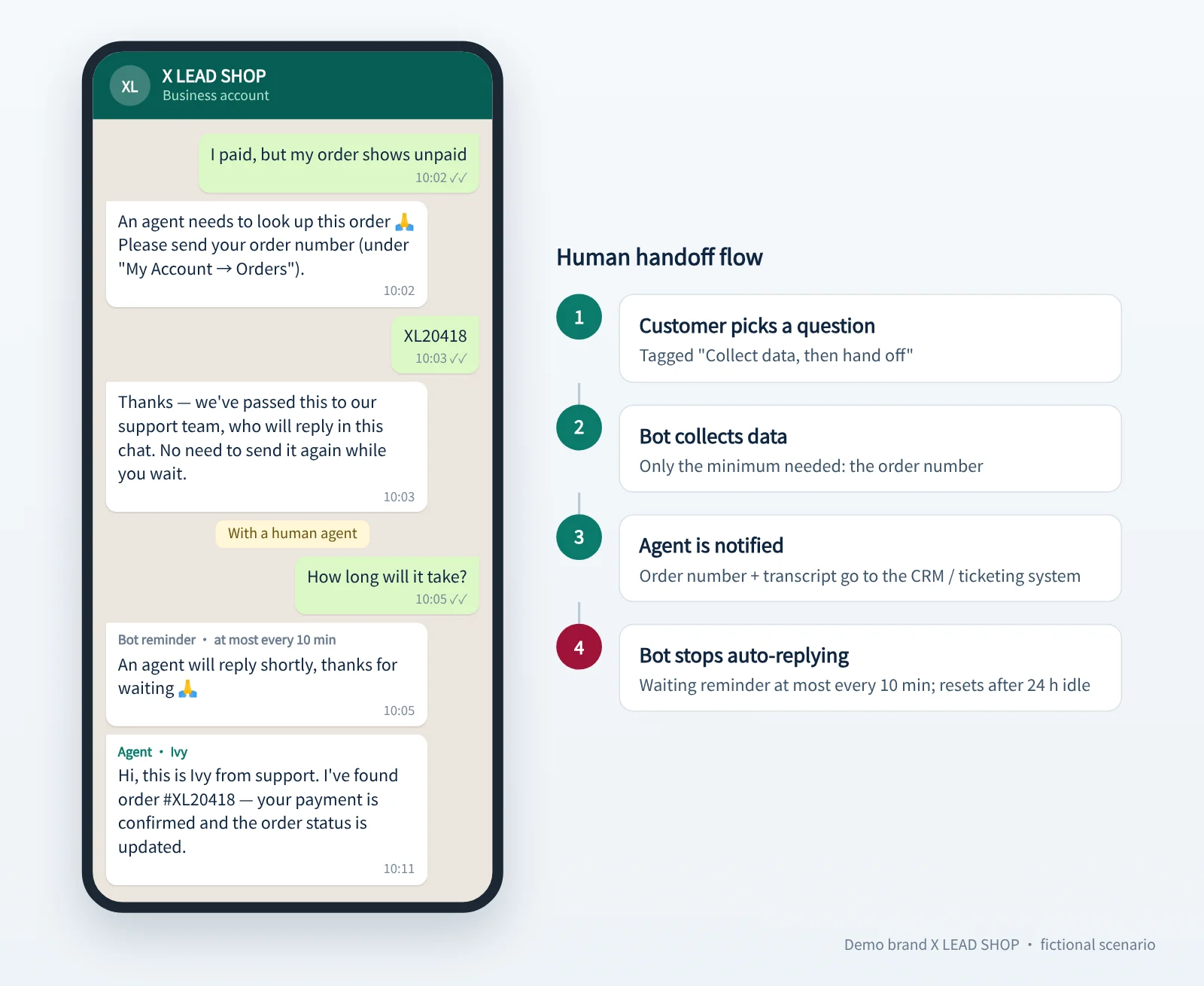
The most common problem after a handoff is the bot and the agent replying at the same time: the agent has just typed a sentence and the bot pops up the main menu again.
Recommended approach:
- On handoff, mark the conversation as “with a human agent” and stop auto-replies.
- If the customer keeps messaging while waiting, have the bot remind them that “an agent will reply shortly” only once in a while (for example every 10 minutes), not after every message.
- Reset the conversation after a period of inactivity (for example 24 hours) so the customer sees the main menu again next time.
What if customers type instead of tapping the menu?
Many customers simply type “refund” or “parcel not arrived.” Use keyword matching to find the 2–3 closest questions and offer them as a list; if nothing matches, show the main menu and point to “Talk to a human.” Never reply “I don’t understand” and leave it there.
Pre-launch checklist
- Duplicate questions are merged; questions without answers are filled in or removed.
- Every list title is within 24 characters and every button title within 20.
- No answer contains web-only phrasing such as “see below” or “click on the left.”
- Every question that needs a lookup has its collection fields defined.
- The bot stops auto-replying once a conversation is handed to a human.
- Every menu level can return to the main menu and reach a human agent.
How UFOSEND’s WhatsApp Business API supports this
UFOSEND sends through the official WhatsApp Business API with quick replies, buttons and list menus. Button taps and collected data can be passed back to your CRM or ticketing system via webhooks, and sent, delivered and read statuses are reported the same way. When you need to collect several fields at once, you can use a WhatsApp Flow in-chat form, which we design and publish for you. See WhatsApp Business API service.
FAQ
Does a WhatsApp FAQ bot need AI?
Not necessarily. In a menu-based dialogue tree every answer is reviewed by the business in advance, which keeps refund and policy wording under control and rules out invented answers. AI can help interpret what customers type, but the answers themselves are best drawn from the reviewed FAQ.
How many options can the main menu have?
A list message holds at most 10 rows across all sections. Six to eight main menu items is a good range and leaves room to add a category later without redesigning.
Does the business pay when a customer taps a button?
Under Meta’s pricing rules effective 1 July 2025, non-template messages sent inside the customer service window are free, and buttons and list messages are non-template messages. Template messages are priced separately; check Meta’s latest published rates.