MMS marketing: image and copy,
in the messages app.
Per-message pricing · Direct carrier routes · Link clicks tracked · Test from the dashboard
MMS lands in the same inbox as texts from friends and family — no app install, no algorithm gatekeeper. Coupons, property launches, birthday surprises: one message with image, copy, and measurable link clicks and redemptions.
Sign up for free MMS trial credit — upload an image and send a test from the dashboard, no credit card required.
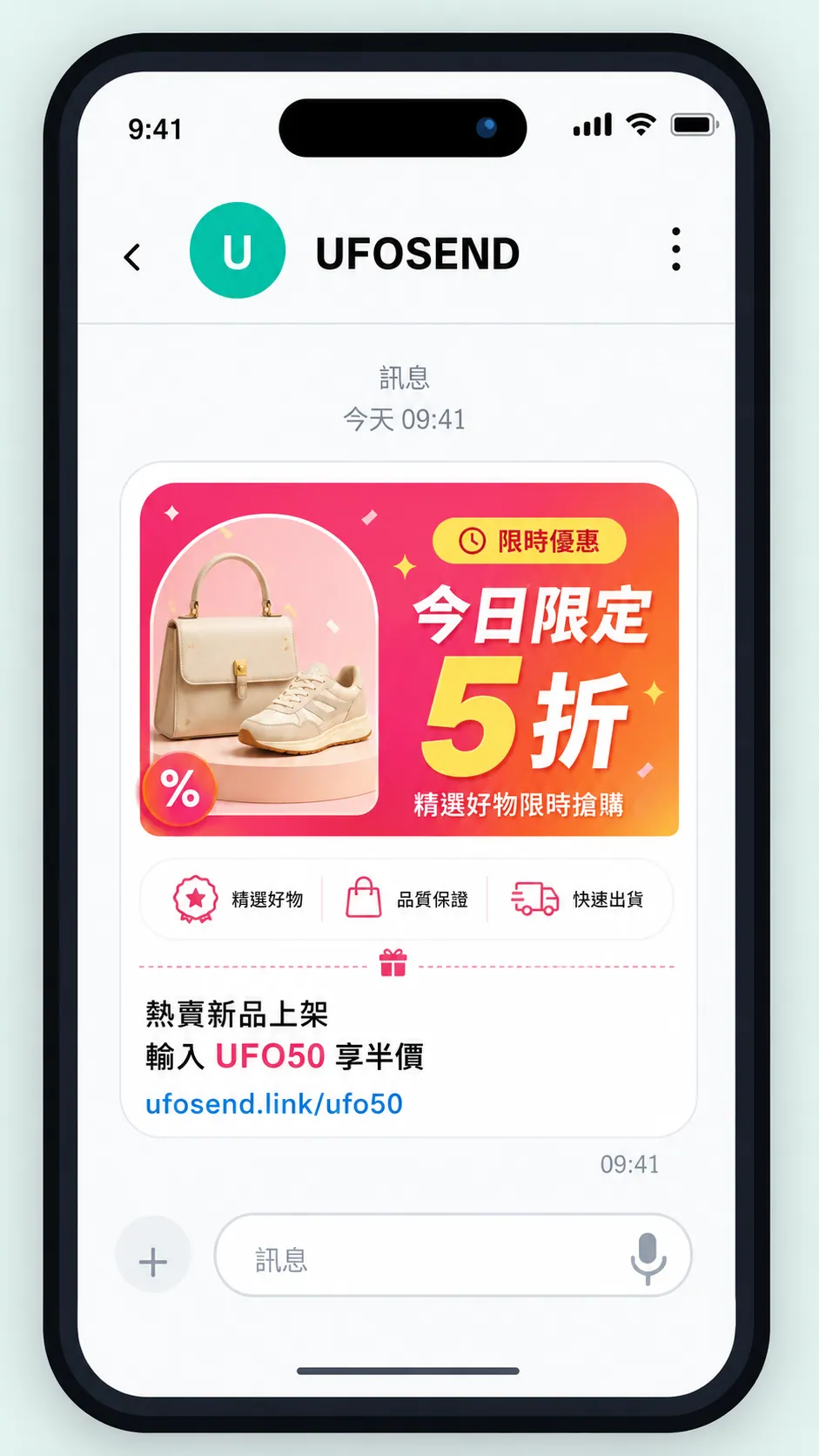
This is how your customers receive MMS
MMS sits in the same inbox as messages from friends and family — no app install, no algorithm in between. The most direct line between your brand and your customers.
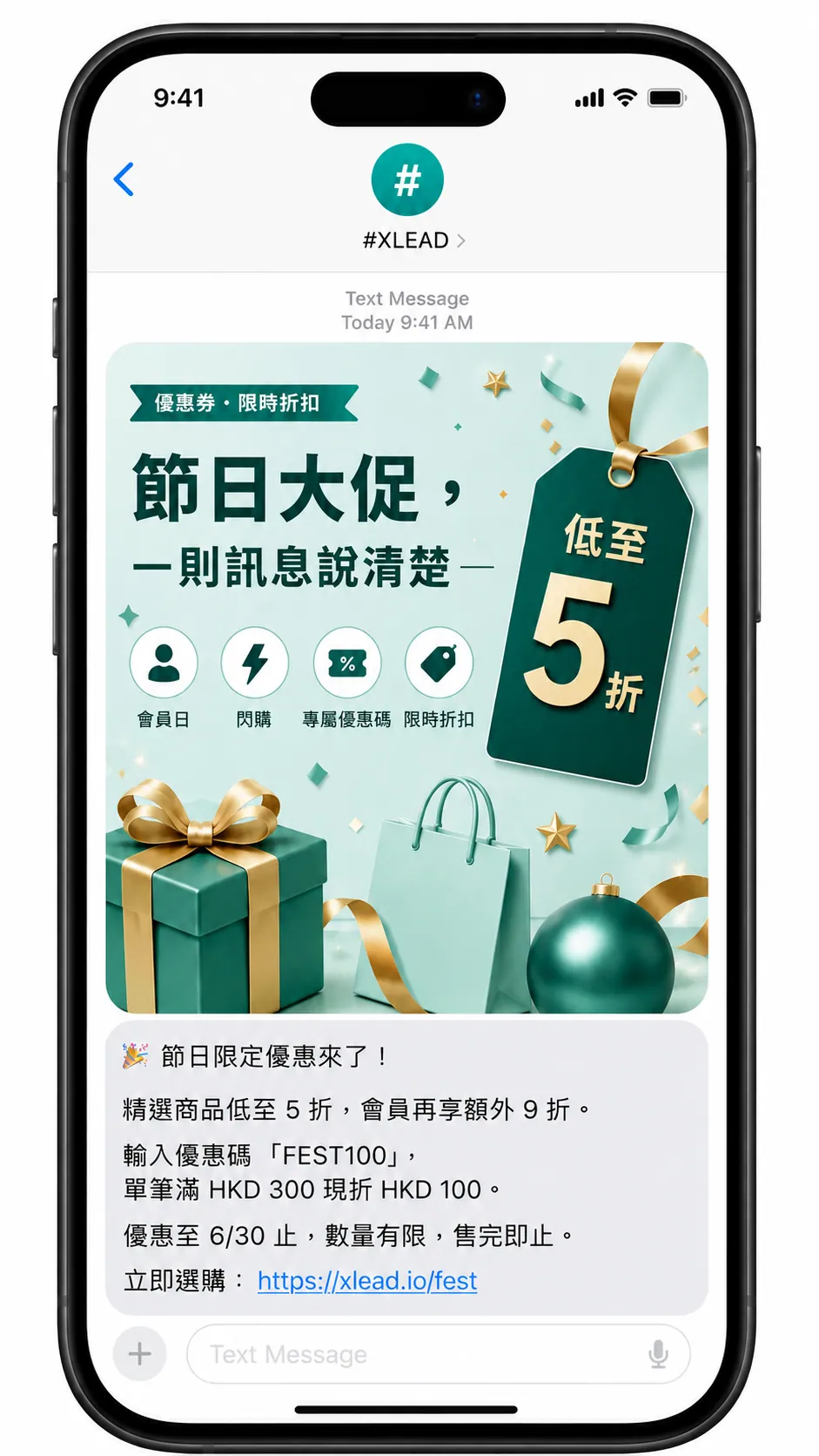
Seasonal sales, one message
Hero image + promo code + trackable link — the offer lands in the inbox, and you see who clicked.
Floor plans and renders beat plain text
One image sets the mood, copy adds location and pricing — straight to your warm list.
Personalized image + offer
Auto-send a branded birthday offer to high-value members — conversion beats bulk email.
Click to redeem — measured end-to-end on X Lead
Built-in X Lead redemption tracking — who clicked, who redeemed in-store, all on one dashboard.
What separates MMS is the mechanism
No open-rate table here — every vendor report gives a different number. This compares mechanics instead: how the message arrives, who can block it, and whether the result can actually be counted. Mechanics decide which channel fits which job.
| MMS | SMS | EDM | App push | Social ads | |
|---|---|---|---|---|---|
| Recipient must install an app first | No | No | No | Yes | Yes (platform account) |
| An algorithm decides who sees it | No | No | Yes (spam and tab filtering) | Yes (OS can collapse) | Yes (auction and ranking) |
| Who owns the list | You | You | You | You | The platform |
| Image and long copy | Both | Text only | Both | Both | Both |
| Per-recipient attribution | Yes (unique links) | Yes (unique links) | Yes | Yes | Mostly aggregate |
| Carrier-grade delivery receipts | Yes (DLR) | Yes (DLR) | Bounces / FBL | No common standard | No |
| Where it lands | Phone message inbox | Phone message inbox | Email inbox | Notification centre | Feed |
| Risk of the account being suspended | None | None | None | None | Yes |
"No algorithm" does not mean guaranteed attention — it means no third party sits between you and your customer deciding whether to show the message. That is a property of the channel, not a promise about results.
Why a retail group puts MMS in the budget
This is not "one more sending channel". For a group that already owns a membership list and runs physical stores, MMS buys a few things advertising cannot.
Your list is an asset
Algorithm changes, rising CPMs, a suspended ad account — none of that is under your control. Member numbers are. Advertising is rented; a list is owned.
No app install required
Shoppers won't install an app for a brand they buy three times a year. MMS lands in the native inbox — older customers and festive one-offs included.
Decide today, footfall tonight
Clearance and weather events can't wait for ad review and a learning phase. Decide in the morning, send in the afternoon, read the store count that night.
Predictable cost
Priced per message — no auction, no wasted impressions. Cap the campaign spend first, then decide who to send to.
Store-by-store targeting
Segment by nearest branch, spend tier, or category, then send a different visual and store address per segment — far better than one shared creative.
Click to redemption, one line
A trackable link plus a redemption code maps back to actual POS redemptions. Who clicked, who walked in — reconciled row by row, not modelled.
Twelve Hong Kong retail windows for MMS
Not a prompt to send every month — it is a way to see the whole year first, then pick the four to six windows that genuinely belong to your brand. Prepare creative and segments two weeks ahead and nothing breaks on the day.
| Month | Window | Angle | Key visual |
|---|---|---|---|
| Jan | Pre-Lunar New Year stock-up | Gift hampers, festive goods, new-year offers | Red and gold key visual + in-store dates |
| Feb | Valentine's Day | Pairs, gift sets, limited packaging | Single hero product + order cut-off |
| Mar | Spring changeover | New season in, last season out | Old-vs-new split + discount depth |
| Apr | Easter and long weekend | Family activities, travel goods, holiday hours | Lifestyle shot + branch address |
| May | Mother's Day | Gift picks, wrapping service, early booking | Gift set photo + booking link |
| Jun | Mid-year sale, Dragon Boat | Mid-year clearance, festive hampers, pre-summer stock | Oversized discount figure + countdown |
| Jul | Summer season | Summer classes, travel, seasonal apparel and appliances | Hero product + instalment or bundle price |
| Aug | Back to school | Stationery, uniforms, electronics, bags | Checklist-style image + store pickup |
| Sep | Mid-Autumn Festival | Mooncake pre-orders, corporate gifting, hampers | Gift box + order cut-off reminder |
| Oct | National Day break, autumn arrivals | Long-weekend promotion, autumn/winter launch | New arrivals display + member preview |
| Nov | Double 11 and Thanksgiving window | Online and in-store together, member day | Discount key visual + personal promo code |
| Dec | Christmas and Boxing Day | Christmas gifting, new year, post-holiday clearance | Festive scene + changed opening hours |
Lunar-calendar dates shift each year, so the table lists months rather than dates — check the current year when scheduling. Want a fill-in version of this planner? Ask us for it →
Track link clicks in SMS — like you do in email
Our own link-tracking layer: every recipient gets a unique link — who clicked, how often, visible in the dashboard in real time. Same logic as EDM open tracking, so you compare campaigns across channels.
- → Handled automatically at send — you only supply the destination URL
- → Dashboard shows clicks, unique clicks, CTR, and time-of-day patterns
- → Pair MMS campaigns with X Lead redemption tracking — click to redeem, fully measured
Build it right and it clears; build it well and it gets clicked
The spec tells you the ceiling, not how to lay anything out. What follows is what we have arrived at after iterating on client creative.
A three-zone layout for 800 × 800
The inbox thumbnail is small and people scan rather than read. Split the canvas into three bands and give each one job.
Key visual
Top 50%One hero product or one festive scene. Avoid a collage of several products — at thumbnail size a collage reads as a smudge of colour.
The offer
Middle 30%The largest type on the canvas. "50% off", "Buy one get one", "$100 voucher" — one number, not three.
What to do next
Bottom 20%"Show this message in store", "Tap the link to claim", plus the expiry. Put the logo here, not at the top competing with the key visual.
Format spec — no surprises
Know the limits before upload, fewer rejections. Text + image combined ≤ 230 KB.
A few rules that actually matter
- Minimum type size
- Keep the headline at 48 px or larger on the 800 × 800 original. A phone thumbnail leaves roughly a third of that, and below 48 px it is effectively unreadable.
- Contrast
- When type sits over photography, add a translucent block or a dark gradient behind it. White text straight onto a light product shot disappears at small sizes.
- Getting under 230 KB
- Resize to 800 × 800 first, then export JPG at quality 70–80 — that usually lands inside the limit. With large flat-colour areas PNG can come out smaller, so it is worth exporting both.
- Split the work between image and text
- The image says what it is and how cheap. The text says how to claim it, where, and until when. Do not say the same thing twice.
- Put the link in the text
- Write the trackable link into the text body rather than printing a URL on the image — a URL baked into an image cannot be tapped and cannot be tracked.
Common rejections and failures
All of these have happened, and all of them are avoidable before you send.
- Image larger than 800 × 800 px
- File format outside JPG / PNG / GIF
- Text plus image over 230 KB combined
- A Sender ID not registered on your account (returns IS)
- Malformed number — a leading +852 or embedded spaces (returns IM)
- Sending to a Hong Kong number without supplying the sender field
- Insufficient points on the account (returns IP)
- Promotional message with no unsubscribe facility — nothing blocks it, but it breaches the UEMO
IS / IM / IP are callback status codes — the full table lives in the API integration guide。
Promotional MMS falls under the UEMO
Send a promotional MMS to a Hong Kong number and you are sending a "commercial electronic message" as the Unsolicited Electronic Messages Ordinance defines it. The duty sits with the sender — we can handle the technical side and the registrations, but it is your list and your content that has to comply. These are the ordinance's main requirements for senders.
What the sender must do
- 1
Provide clear and accurate sender information
The message must identify the sender and give contact information, neither hidden nor falsified. Calling line identification information must not be concealed either.
- 2
Provide an unsubscribe facility and a statement
Every commercial electronic message must carry an unsubscribe facility plus a statement explaining how to use it. For short messages, that must include at least one Hong Kong telephone number on which an unsubscribe request can be made orally or by key input.
- 3
Honour unsubscribes within 10 working days
Once a request is sent, you must stop sending further commercial electronic messages to that electronic address within 10 working days from the day the request was sent.
- 4
Do not send to numbers on a Do-not-call Register
The Communications Authority maintains three registers — for facsimile messages, short messages, and pre-recorded telephone messages. From the 10th working day after a number is registered, you may not send commercial electronic messages to it unless the registered user has consented.
- 5
No misleading subject headings
Email messages must not carry misleading subject headings. The same principle carries into the body: discounts, expiry dates and conditions have to match reality.
What we handle on our side
- DNC register filtering
- Both the dashboard sender and the API skip numbers on the Do-not-call Register by default (the API field send_also_ofca_registrants defaults to false).
- # Sender ID registration
- We handle the OFCA-registered sender name so recipients can see at a glance which company the message came from.
- Unsubscribe list management
- The platform maintains an unsend list, and numbers that have opted out are excluded from later sends.
- Pre-send content review
- We check the unsubscribe statement and sender information are in place before you send, which heads off disputes afterwards.
This is a summary of the key duties to help you plan a campaign; it is not legal advice. For actual compliance requirements, rely on the ordinance itself and the current guidance from the Office of the Communications Authority.
Sources: OFCA: Unsolicited Electronic Messages Ordinance The ordinance itself (Cap. 593) OFCA: industry guide (PDF)
Run your own CRM? Send MMS from code
Think of UFOSEND as a sending socket wired into your stack: a member birthday in the CRM, an order dispatched, tomorrow's appointment — your system makes one call and the picture message leaves through the carrier channel, no manual steps.
Event-triggered, hands-free
Birthdays, dispatch notices, day-before reminders — your system decides when, and the message goes out on time without anyone pressing send.
One API for SMS and MMS
Same API key, same callbacks — text goes as SMS, visuals go as MMS. Integrate once.
Results flow back
Delivery status and link clicks return via webhook — who received, who clicked, written straight back to the customer record.
Campaigns that land — honestly
MMS only works if people see it. We focus on getting every campaign into the everyday messages inbox and reporting what actually happened.
● Native messages inbox
Not email, not an in-app channel — the same thread list as texts from friends and family.
● Link click tracking
Unique link per recipient — who clicked, what CTR, live in the dashboard. Same logic as EDM.
● Redemption tracking
Pair with X Lead redemption offer tracking — MMS click to in-store redeem, ROI measured.
● Full submission pledge
Every send request you make is submitted to the network — counts reconcile; failures show a reason, not fake success.
● Scheduling & A/B built in
Send-at timing and headline A/B tests that auto-roll the winner to the rest — from the dashboard.
● Same platform as SMS / EDM
Shared audience and send history — SMS triggers, email nurture, MMS flash offers together.
FAQ
Can I schedule sends? +
Yes. SMS, MMS, EDM, and WhatsApp all support send-at date and time in the dashboard — appointment reminders, event countdowns, flash offers, newsletters, and template broadcasts go out at the right moment. The API accepts scheduling parameters (e.g. scheduled_at) for system-driven sends. Edit or cancel before the window; SMS and MMS fire DLR after send; WhatsApp reports delivery and read; email has delivery and open tracking.
Can recipients receive SMS / MMS while they are overseas? +
Usually yes — as long as you send to their registered mobile number (e.g. a client's +852 HK line), the message reaches their home carrier first, then forwards abroad via international roaming. SMS and MMS work differently — delivery and cost are not the same, so we split them below.
Cost: sender (you) — Sending to +852 does not add a separate "roaming send" surcharge because the recipient happens to be abroad; you pay our standard SMS / MMS rate. If they have moved and you send to their new local number, that region's rate applies (see "Can one account send to other regions?").
Cost: recipient — Whether they pay anything depends on their own mobile plan and roaming terms; we cannot guarantee on behalf of their carrier. We recommend telling end users to check roaming SMS / data charges with their provider before travel.
SMS (text only)
• Delivery: OTP and transactional messages usually arrive; occasional delays of seconds to a few minutes. Plain text does not require mobile data to be on.
• Recipient cost: Some plans include free incoming SMS on roaming; others charge per message — carrier-dependent.
• When it fails: Roaming disabled, weak signal, phone off / airplane mode, or some roaming carriers filtering marketing SMS.
MMS (multimedia message)
• Delivery: Less reliable on roaming than SMS — use SMS for time-critical notices.
• MMS with an image: A notification may arrive first, but downloading the image usually needs mobile data (MMS retrieval often does not work over Wi‑Fi alone). If data roaming is enabled, opening or auto-downloading the image can trigger roaming data charges — even when "receiving the message" is free on their plan, loading the image may still bill data.
• Text-only MMS (no image): Still MMS on the network; the phone must fetch a small payload — far less data than image MMS. It may need a brief mobile-data connection but rarely causes noticeable roaming data fees; delivery is still less dependable than SMS.
For both SMS and MMS we submit to the home carrier as normal and report carrier-side status honestly via DLR.
Sender ID / # Sender ID — what are they and why do they matter? +
Sender ID is the sender name shown on the recipient's phone. In the 852 region there are two common forms: an alphanumeric Sender ID (e.g. YourBrand), typically live within one business day; and an OFCA # Sender ID under Hong Kong's SMS Sender Registration Scheme (e.g. #YourBank) — only businesses vetted and registered with OFCA and the Communications Authority may use the # prefix.
What's the difference? Alphanumeric shows your brand name; # additionally signals to recipients that the sender is officially registered, helping distinguish legitimate messages from phishing — they see #YourBank instead of plain YourBank.
Why does it matter? For finance and high-trust use cases, # Sender ID is becoming a baseline customer expectation. We handle alphanumeric and OFCA # registration, content review, and naming advice — you just provide company details.
What formats does MMS support? +
Images support JPG / JPEG, PNG, and GIF — we strongly recommend JPG / JPEG for the smallest file size and fastest delivery. Each image must be no larger than 800 × 800 px.
Many teams assume MMS has "almost no text limit" — carriers actually cap the total MMS payload (text + image combined) at 230 KB. Plain text is tiny: about 30 KB for 10,000 Traditional Chinese characters, so copy can run long — but whatever is left of the 230 KB budget goes to the image. Example: 30 KB of text + a 200 KB image = 230 KB at the limit. Preview total size in the dashboard before send to avoid rejections.
How is MMS priced, and how does it differ from SMS? +
MMS is billed per message — one message is one unit, unlike SMS, which splits long copy into segments and bills each one. So once your copy runs past three SMS segments (about 210 Chinese characters) or needs an image, a single MMS is often cheaper than a run of SMS segments, and the image renders inside the message with no link to tap.
Pricing is a custom quote based on your volume and use case — the steadier the volume, the better the plan. Book a free consult for a tailored offer, or start a free trial first: trial credit on signup, upload an image in the dashboard and send a test to your own phone, no credit card required. Format and size limits are in "What formats does MMS support?".
Will my MMS actually land in the messages app? +
Yes. MMS travels via direct carrier routes into the phone's native messages inbox — not email, not an in-app channel. Every MMS gets a delivery report; failures include a reason, with no pretending "accepted" equals "delivered". Your dashboard shows the state of every campaign message.
How fast can my dev team integrate? +
After signup you can configure the API quickly and send a test SMS or MMS from the admin dashboard in one click. Most teams start integration with our 4-language sample code right away. A named integration engineer is assigned within 24 hours when you need help with blockers.
Do you submit every send request I make? +
Yes. That's our full submission pledge: every send request your API makes that we accept is submitted to the carrier network — counts you can reconcile against your own request logs in the dashboard, with exports for audit. Whether the carrier then delivers to the handset is reported honestly via DLR; we don't silently drop or shave volume before it leaves our platform. See the Honest Delivery Standard.
Do you really refuse grey routes? +
Yes — and we're happy to explain what they are. A grey route is a cheaper third-party hop that disguises sender identity. Carriers can detect and block them, hurting delivery rates silently. Our SMS and MMS routes are SS7-direct with the carrier, which costs more per message but produces honest DLRs.
Try MMS free, straight from the dashboard. No credit card.
Sign up for free MMS trial credit — upload an image and send a test from the dashboard, no credit card required. Self-serve account, so you can confirm the platform fits your use case first; enterprise teams can also contact us for assisted onboarding.