What Is MMS? Hong Kong Picture SMS — Per-Message Pricing and a Test Send
Published Updated
On this page
MMS (Multimedia Messaging Service) is picture-and-text messaging sent to a mobile number — beyond plain text, you can attach images, audio, or short video. The rich messages you see in your phone’s messaging app are usually MMS; if you only have plain text, roughly 160 English characters or about 70 Chinese characters per segment, that is SMS.
Hong Kong businesses commonly use MMS for promotions, event notices, and longer customer communications. A single message can embed brand imagery, which is often easier to read than multiple SMS segments and can cost less (see below).
Key takeaways
- MMS is a mobile message that can carry images, audio or short video, sent to the same mobile number as SMS.
- MMS is billed per message; SMS is billed per segment. Once copy runs past three SMS segments, MMS is often the cheaper option.
- On UFOSEND each MMS is capped at 230KB (text plus image) with images no larger than 800×800 px; JPEG in a vertical layout works best.
- Images usually fail to arrive because mobile data is off, the recipient is roaming, the file is too large, or the route is poor.
- Marketing MMS falls under Hong Kong’s UEMO: unsubscribe facility and Do-Not-Call Register screening are mandatory.
- Sending picture messaging in Taiwan? See Taiwan MMS service (Traditional Chinese).
Planning an MMS campaign? Coupons, property launches, member birthday offers — image and copy delivered together to the customer’s inbox. See MMS marketing, or start a free trial: sign up for trial credit, upload an image and send a test from the dashboard, no credit card required.
Common questions (answers to what you are most likely searching for)
What is MMS?
MMS stands for Multimedia Messaging Service. In Chinese it is often called 多媒體短訊, MMS 訊息, or MMS 傳訊. It uses the same mobile number as SMS, but can carry images and other media — not just short text.
Are MMS messages, MMS texting, and multimedia messages the same thing?
Yes — in everyday Hong Kong usage they usually refer to the same service. Whether you search “what is MMS”, “what is an MMS message”, or “what is multimedia messaging”, you are asking whether a phone can receive a text with images or longer copy. The technical name is MMS.
Sending to Taiwan? See Taiwan MMS picture messaging.
How do MMS and SMS differ?
| SMS | MMS | |
|---|---|---|
| Content | Primarily text | Text + image / audio / short video |
| Length | GSM-7 ~160 chars per segment; Chinese Unicode ~70 chars per segment (billed per segment) | Capacity measured in KB, not per-segment character count |
| User experience | Plain text; long copy splits into multiple messages | Images display inside the message — no link tap required |
| Typical uses | OTP, transaction alerts, short reminders | Promo posters, event details, cart-abandonment reminders, longer notices |
| Billing | Per SMS segment | Per MMS message |
For segment rules in detail, see How SMS billing works in Hong Kong. If your content exceeds 2–3 SMS segments, compare whether MMS could save cost.
How much does MMS cost for Hong Kong businesses?
MMS is generally billed per message, not accumulated by SMS segments. On the UFOSEND platform, each MMS carries up to 230KB (text plus images) — plain text is tiny, about 30KB for 10,000 Chinese characters, far more than three or more SMS segments, with embedded visuals for better engagement. For how MMS billing works and why messages fail, see MMS charges, MMS not arriving, and how it really differs from SMS.
Actual unit pricing depends on volume and contract. See MMS service details or contact us for a quote. To see real results before deciding, start a free trial — trial credit on signup, no credit card required.
Why does MMS sometimes fail to arrive, or images fail to download?
Common reasons include:
- Recipient has MMS or mobile data disabled: MMS with images often needs a brief data connection to download content (unlike plain SMS).
- Roaming abroad: When recipients are overseas, MMS delivery rates are usually lower than SMS; image download may incur roaming data charges. See Do SMS and MMS still reach you overseas?.
- File too large or wrong format: Exceeding platform or carrier limits leads to rejection.
- Routing or carrier filtering: Grey routes or low-quality paths can show “submitted” without true delivery — see Grey routes vs direct carrier connection.
Enterprise senders should require genuine DLR (delivery receipts), not only API success responses. Status code reference: SMS DLR status codes explained.
Technical differences between MMS and SMS
Although MMS and SMS both run on mobile networks, there are key differences:
- Capacity: SMS is limited by character count and segmentation; MMS sends multimedia packets — on UFOSEND, up to 230KB per MMS for long copy and images.
- Presentation: Images, GIFs, and similar assets embed in the message so recipients see visuals without opening an external link (still mind roaming and data settings).
- Use cases: When you need brand visuals, product shots, coupon QR codes, or longer policy text in one go, MMS often beats sending many SMS segments.
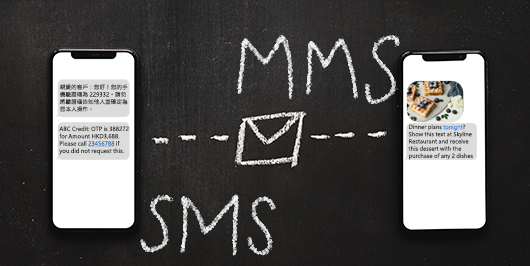
Common MMS use cases for Hong Kong businesses
- Discount codes, vouchers, new product images, or short clips to target customers
- Festive animated cards to strengthen brand warmth
- Product tutorial videos extending after-sales service
- Cart-abandonment reminders with product images to encourage checkout
- Travel or retail: scenery shots, package deals, e-tickets, and more
Marketing MMS must comply with Hong Kong’s Unsolicited Electronic Messages Ordinance (UEMO) — unsubscribe facilities, Do-Not-Call Register filtering, and more. See the Hong Kong promotional messaging compliance checklist. OTP and transaction notices follow a different compliance path and should not share content or routing with promotions.
Multimedia file guidelines (UFOSEND platform)
For deliverability and readability:
- Images: JPEG; animation: GIF; vertical layout suits full-screen mobile viewing
- Total MMS size capped at 230KB (text plus image); plain text is tiny (about 30KB for 10,000 Chinese characters), so the budget really goes to the image — e.g. 30KB of text + a 200KB image is right at the limit
- Each image no larger than 800×800 pixels; preview the total size in the dashboard before sending to avoid rejections
- Keep the subject line short (within ~64 characters); keep body copy concise where clarity allows
Image ready? Upload it in the dashboard and send a test to your own phone to check how it renders — start a free trial, trial credit included on signup. The full creative guide is on the MMS marketing page. For size, payload and format item by item, see MMS image size, file size and format — the complete guide.
When is MMS smarter than SMS?
When your message needs more than three SMS segments (especially with Chinese Unicode), switching to MMS often lowers total cost and improves readability. Examples: detailed opening hours, multi-clause campaign terms, brand notices with images — one MMS replacing six to eight SMS segments is common among our clients.
If you are evaluating channels, read SMS as a funnel entry point and place MMS in welcome sequences, campaign conversion, and member communications.
Planning an MMS campaign? Start a free trial and send a test from the dashboard, or see MMS marketing for campaign windows and the creative guide. For DLR reporting or wiring MMS into an existing API, contact us for a demo; technical integration is covered in the SMS API integration guide. For ready-to-adapt copy across the year’s festival windows, see Hong Kong festival MMS templates.