Inside the SMS platform — dashboard and reporting
Published
Inside the SMS platform — the dashboard and the reports
In this article: ► The data that shows how effective your SMS is ► Sending takes three steps, with .xlsx import and scheduled sending ► The feature that wins it — tracking who clicked your link
As a marketer or a business owner, the data you want is obviously: - how many SMS were sent - how many were actually delivered - what each campaign cost, and so on
First, a cloud platform must display real data *. And reporting your SMS usage in dull, lifeless figures is not the service we want to provide — we think clean charts visualise campaign performance better and make it easier for you to assess.
* Why do we keep saying “real data”?
You may not be closely familiar with how SMS platforms and this industry actually operate. To understand more, read our other article, Why SMS goes missing.
Here are some screenshots from our system:
- The campaign list
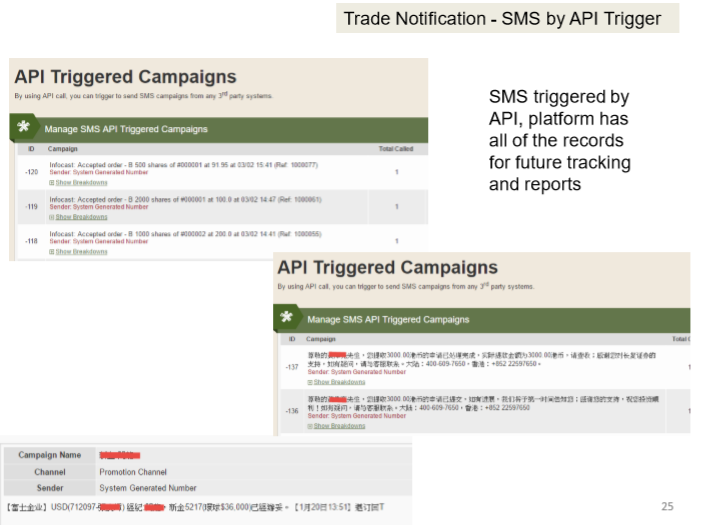
- Transactional notifications — SMS triggered through the API
- The platform records every SMS triggered by API, for later tracking and reporting
- Using an API call, you can trigger an SMS send from any third-party system to start a campaign
2. Delivery reporting
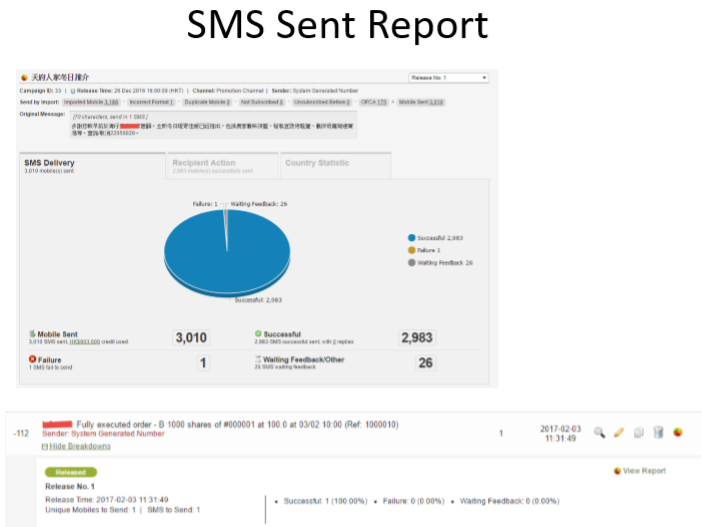
- SMS send report
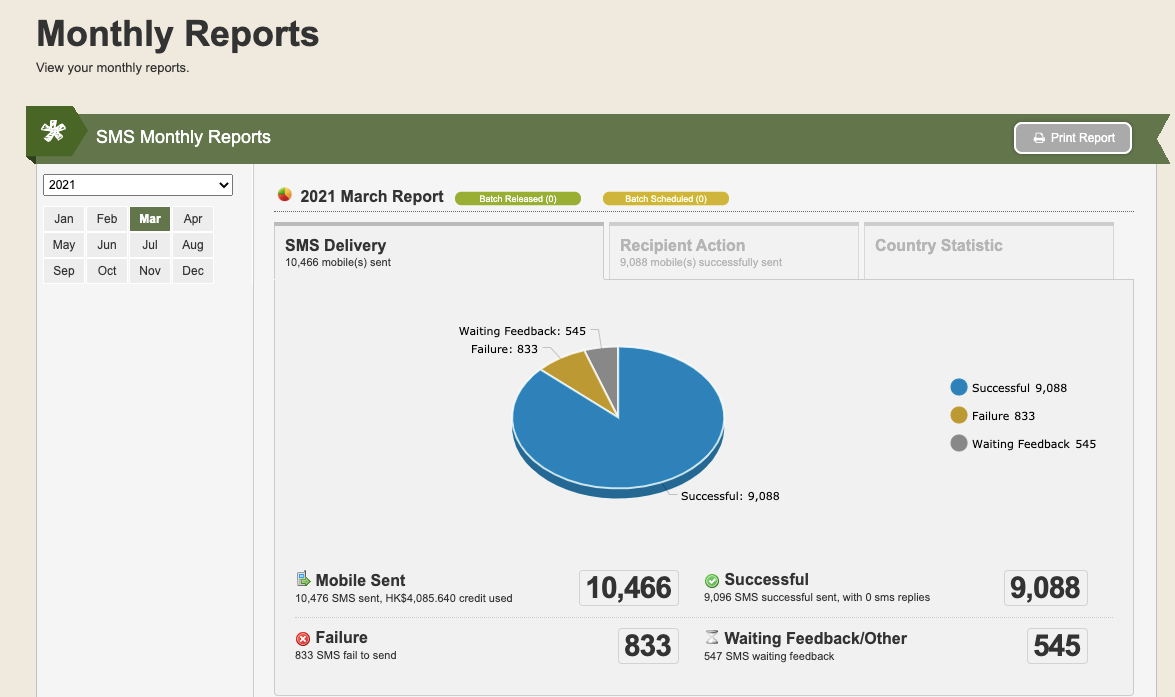
- Monthly report
3. Two steps to send an SMS
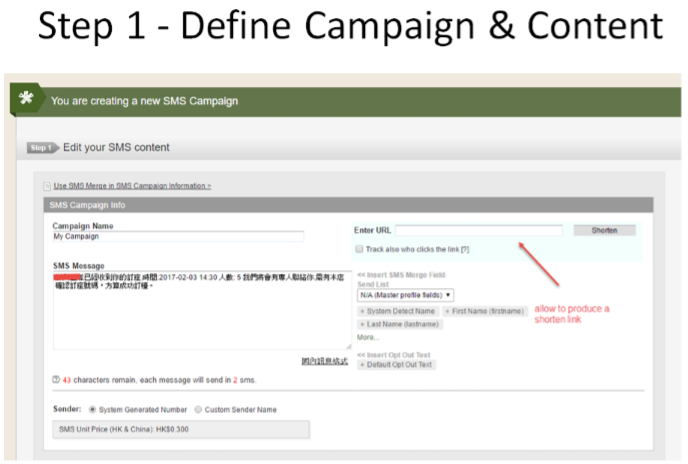
- Step 1 — configure the campaign and the content
- Step 2 — set the target and send
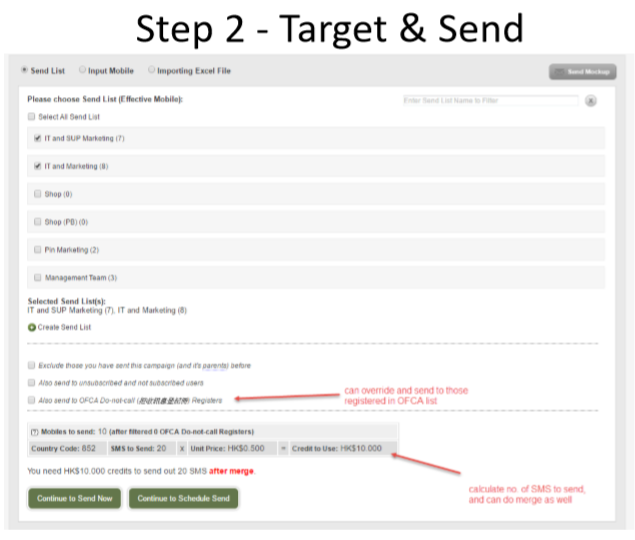
You may have noticed two features of ours in the screenshots above — link shortening and appended tracking codes. Unlike eDM, SMS by default has no mechanism to track who opened it or clicked the links inside.
But…
Our system lets clients append a tracking code that identifies the recipient. When someone clicks the link inside the SMS, the system records it and tells the merchant which prospect was most interested in the campaign, which supports retargeting.
What tracking codes are good for
Here is a concrete example to make the benefit clearer. A finance and lending company wants to know who is interested in its quotation. Put simply, once the lender knows who clicked the link inside the SMS, it can classify that recipient as a prospect and begin following up.
The merge mechanism
As you would expect, every code-tracking system involves a merge mechanism. What is a merge? Imagine you want to send the same message to 100 people in a personalised way, but each recipient has a different name. What do you do? You define a merge parameter first, and the system then automatically sends 100 personalised messages to that group based on an uploaded Excel file or a stored recipient list.
OFCA DNC
Also, in Hong Kong, if you want to use tracking codes with a merge function, you must comply with the OFCA Do-not-call Register requirements. In other words, when sending promotional messages you must skip users listed on the register. Interestingly, in certain circumstances an exemption is available and you can send to those users — and our system provides that option.
Successful delivery
Some clients ask what “successfully delivered” means. To answer that, we have to look at the delivery process. When you trigger an SMS send, our system immediately passes the request to the carrier, and the carrier then has to confirm to us that the request was accepted and the SMS sent — that is “successfully delivered” (note that some dishonest providers do not report the real data **). A short time later, some recipients’ handsets may return a “received” confirmation to the carrier, and the carrier then updates our system to note that the recipient received it. But not every device replies, so the most accurate figure is to treat the carrier’s “successfully delivered” as the most important number in the report. The carrier’s response, in other words, matters enormously — so wherever possible, every merchant should ask their provider to produce carrier confirmation, or at minimum an SLA guaranteeing there is no cheating in the sending process.
** Why do we emphasise “real data”? You may not be closely familiar with how SMS platforms and this industry actually operate. To understand more, read our other article, Why SMS goes missing.
Marketing strategy
You can start a campaign simply by logging into the UFOSend system and sending SMS — it is genuinely convenient. If you already have your own CRM or mobile app, you can also connect via API and send from there. For more detail, read API integration.
There is also a well-regarded formula that helps you attract new traffic and grow your database. In SMS as the entry point to your funnel we set out the redemption funnel in detail — the most effective tool for introducing your service to prospects. What may surprise you is that a promotional campaign can cost very little, because all you need is a simple landing page for prospects to register on, after which you send a redemption code by SMS to draw them back into the store. Do not underestimate how simple the setup is: experience tells us the results merchants get are consistently impressive.